In this buyer’s guide to office data cabling, we outline what you need to consider when planning a cabling system for your office environment.
What cable type should you use?
Copper data cables are classified into three main categories, the most common being Cat5e, Cat6 and Cat6a. Let us start by saying that a Cat6 unshielded cabling system is the best-suited in most circumstances. This may change if you need 10 Gigabit per second (Gbps) to every device, in which case Cat6a is likely to be the answer.
If it is the lowest cost solution you are after, Cat5e may be fine, but it won’t be able to support speeds over 1 Gbps or the more powerful Power over Ethernet (PoE) standards.
The maximum installed length of a Cat6 cable run is 90 metres (55m if you want 10Gbps) so, if your offices are large, you may need to have more than one data cabinet, interconnected with backbone cables.
Data cabinets can be linked with Cat6a cable if they are within 90 metres of each other. Larger cabling systems may have a central cabinet and more than one satellite cabinet. Backbone links of more than 90 metres will need to be over fibre optic cable.
Cat6a is usually a shielded cable, and this has the benefit of reducing the effects of noise, although this is rarely a problem in office environments.
| Speed | Distance | |
| Cat5e | 1Gbps | 100m |
| Cat6 | 1Gbps | 100m |
| Cat6 | 10Gbps | 55m |
| Cat6a | 10Gbps | 100m |
Data cabling routes and containment in office environments
The availability of cable routes will have a bearing on the price because a modern building with raised floors or suspended ceilings will be easier to cable than one with floorboards and solid ceilings. Trunking may have to be installed. This will add to the cost and may affect the décor and aesthetics. Cat6a cable is 40% larger than Cat6 and has a bigger bend radius so larger containment would be required. Cat5e is 33% smaller than Cat6.

Data Cabling Enclosures in an office environment
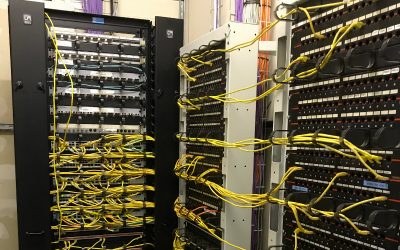
In the comms room, it’s normal practice to terminate cable runs in a cabinet or open rack. Whilst enclosed cabinets are the usual choice, open racks are suited to secure, airconditioned comms rooms.
Always specify a cabinet that has room for expansion, is wide enough to allow tidy patching and is deep enough for any equipment you may ever want to install in it. Most cabinets also have active equipment in them so power distribution and cooling needs to be considered. Unless space is at absolute premium, allow room for cable organisers so that patching can be kept tidy.
Consider the power distribution requirements with the cabinet for any powered devices.
ID Labelling Data Outlets and Panels
Insist that all outlets and panels are labelled clearly. It will make it easier to install patch cables, and to diagnose any patching problems that may arise.
Testing your office data cabling
To ensure the cabling system will perform reliably and to the full specification, request that all links should be tested with a cable certifier such as a Fluke DSX. Anything less could leave you with a cabling system that will give you problems either at the commissioning stage or later.
Cabling should be certified to the relevant BS EN 50173, TIA or ISO 11801 standard.

Documentation for your office data cabling
Ask for a floorplan showing the location and ID of each data outlet and cabinet / rack.
Budget vs Premium Products for office data cabling
You can buy a low-cost or premium product (cable, connectors etc.) and you mostly get what you pay for. A lower priced but good quality solution can provide the same benefits and virtually never fail. It just has to be correctly designed, installed and tested. If you’re buying from a reputable installation company, they won’t supply poor quality product because they will be responsible for it.
In favour of a premium solution, most of the cost of an installation is for labour, and this is the same whatever the materials, so specifying better components may only add 15% to the final cost. The better manufacturers usually select and train their installation companies more thoroughly.
Warranty for office cabling
25-year cabling system warranties are commonplace now and will guarantee to replace any product that doesn’t continue to perform to specification. However, these warranties may not include the cost of reinstalling the product. When buying, check what the warranty covers and for how long.